Every detail of the day, handled.
SIAPNS is a Windows application that runs on your institute’s own PC, with phones for teachers, the owner and the accounts office. Here is everything it does, one part at a time.
A scan at the gate. The rest follows.
Present, late and absent are worked out from each class’s own timing, and every parent is told within seconds.
Your device, as it is
ZKTeco and compatible fingerprint, face and card devices, over LAN, Wi-Fi or USB. Users already enrolled on the device are imported and matched to students and teachers.
Late means late for that class
Each class has its own start time and late window. A student scanning after it is marked late, and the parent hears exactly how late.
Absence alerts that are never wrong on a holiday
Absence messages go out only when at least one in five students and teachers has checked in that day. A public holiday or a closed day sends nothing.
Teachers too
Teachers’ check-ins and check-outs are recorded. Each teacher gets a WhatsApp welcome with today’s classes, a reminder five minutes before every period with how many students are in, and a summary on the way out.
Small things done right
A second scan within two minutes is ignored. The institute day runs from 4 am to 4 am, so classes until midnight count on the right day.
Parents hear it from you, first.
From your institute’s own number, with your name and logo. No app for parents to install.
Everything a parent wants to know
Arrival and departure, late and absent, test results, behaviour notes, fee vouchers, reminders and receipts, and a monthly progress report.
Your brand on every message
Your logo becomes the number’s profile photo. Vouchers, receipts and monthly reports arrive as a picture with your logo, the message underneath.
Nothing lost when the internet drops
Messages wait in a queue and go out by themselves when the connection returns, even days later. Failed sends are retried, and a voided receipt that has not gone out yet is stopped.
More than one number
A large institute can link two or three numbers that share the messages and cover for each other. Each number sends at a careful pace, which keeps it safe.
Six months of history
Every message stays on the Messages page with its status: sent, waiting with the reason, or stopped. Search any parent, any day.
Every rupee, accounted for.
Vouchers that make themselves, parents who know where to pay, and an accounts office with its own login.
Plans that fit how you charge
Class-wise or subject-wise monthly fees, admission and exam fees, and discounts per student. A fee rise applies from its month on and never changes old vouchers.
Vouchers on the 1st, by themselves
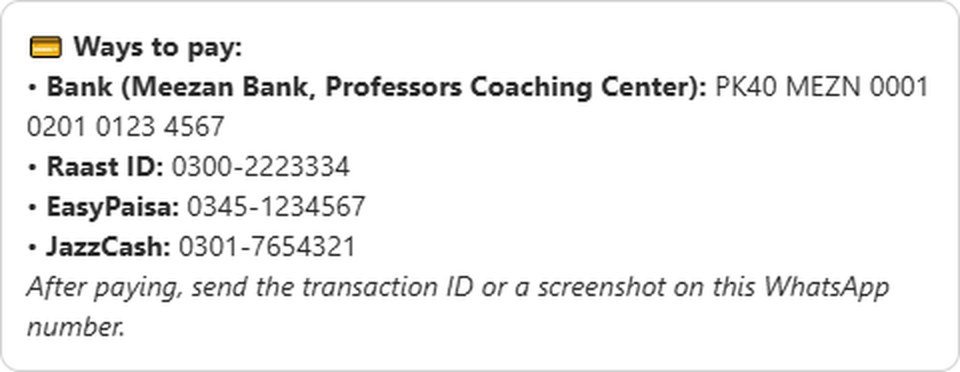
Every student’s voucher goes to the parent on WhatsApp with the amount, the last date, any previous dues, and how to pay: your IBAN, Raast ID, EasyPaisa and JazzCash, with a QR code on the voucher picture.
Polite reminders, then a fine
A reminder before the last date, overdue reminders after it at the interval you choose, and a flat late fine added once. They stop the moment the fee is paid.
A login for the accounts office
The fee counter gets its own sign-in that shows Fees and nothing else, on the PC or on a phone. It is not counted in your billing.
Each transaction ID, once
Bank, Raast and wallet payments are recorded with their transaction ID. If the same ID was already used, SIAPNS names that receipt and asks, so nothing is counted twice.
A clean close every evening
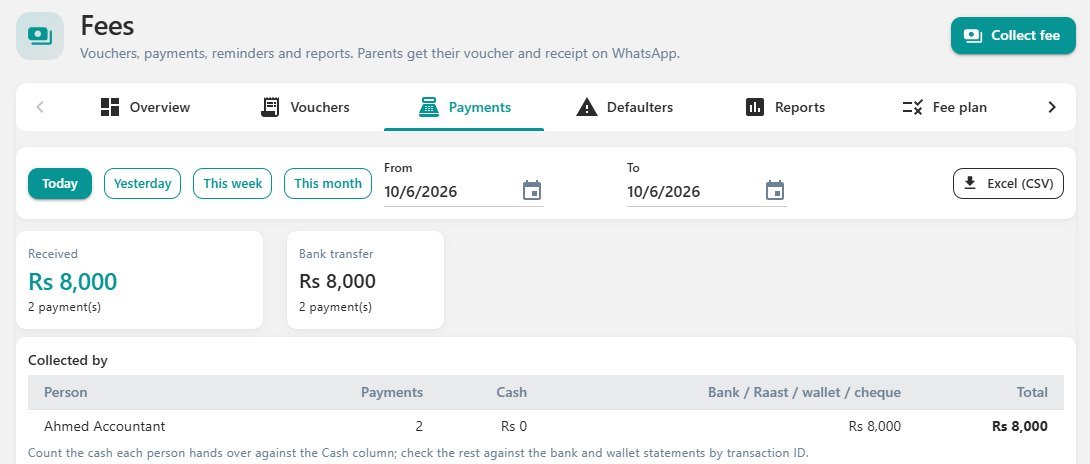
Today’s takings by method and by person: the cash each person should hand over, and the rest to match against the statements. Exports to Excel.
Nothing ever deleted
Partial and advance payments, a ledger per student, defaulter lists and monthly income. A mistake is voided with a reason and the name of who voided it, and stays on record.
Results reach home the same evening.
Marks entered once for a whole class; every parent gets their own child’s.
Test entry in one screen
Choose the class, the test and the total, type each student’s marks. Marks above the total are refused, and the same test cannot be sent twice.
Behaviour in a tap
Ready notes for good behaviour, disruption or missing homework, or your own words. The parent is told straight away.
One report per student, every month
Attendance, every test and every behaviour note of the month, sent to each parent as a branded report.
A timetable for every teacher
Periods by day, class, section and subject, with a warning when two periods clash. Teachers see only their own classes.
No queue at the one office PC.
Nothing to install: SIAPNS opens in the phone’s own browser while it is on the institute Wi-Fi.
Teachers
Today’s periods and who is in, test marks for their own classes, and behaviour notes.
The owner
The day at a glance, attendance by class, fees with search, and collecting a fee with the receipt sent on WhatsApp.
The accounts office
Fees only: find a student, collect, and the parent gets the receipt.
Linked safely
A phone is linked once with a QR code that works for five minutes, or a personal WhatsApp link that works once. No password is ever typed on a phone. A lost phone is removed in one click, and a teacher who leaves is signed out everywhere.
Built so that nothing is lost.
Your records stay on your own PC, encrypted, and on a USB drive kept away from the building.
Encrypted, checked, kept
Every day, one hour after the last class, an AES-256-GCM backup is written, opened again to prove it is complete, and copied to the USB drive whenever it is plugged in. The last 7 days, then one a day for 30 days, then one a month for a year.
A new PC in minutes
If the PC breaks or is stolen: install SIAPNS on a new one, choose the newest backup on the USB drive, enter the owner’s recovery code. Without that code, nobody can open a backup, not even SIAPNS support.
Accounts that defend themselves
Repeated wrong passwords lock the sign-in for a while, SIAPNS locks itself when the PC is left idle, and each person sees only their own part.
Fair, signed licences
Your plan travels as a licence signed by our control room. If a subscription ends, SIAPNS gives a reminder and three days of grace, then turns read-only: records stay visible and backed up, nothing is ever deleted, and renewal restores everything within minutes.
A PC you already have, most likely.
The institute PC
Windows 10 or 11 (64-bit) with at least 8 GB of RAM. One installer brings everything, including the WhatsApp connection, and needs no administrator password. Updates keep all your data.
Around it
An internet connection, a phone number for WhatsApp (a separate SIM is best), a fingerprint device for automatic attendance, and a USB drive for backups.
And us
We install, set up the first day with you, and watch over your SIAPNS from the control room afterwards.
Book a live demo